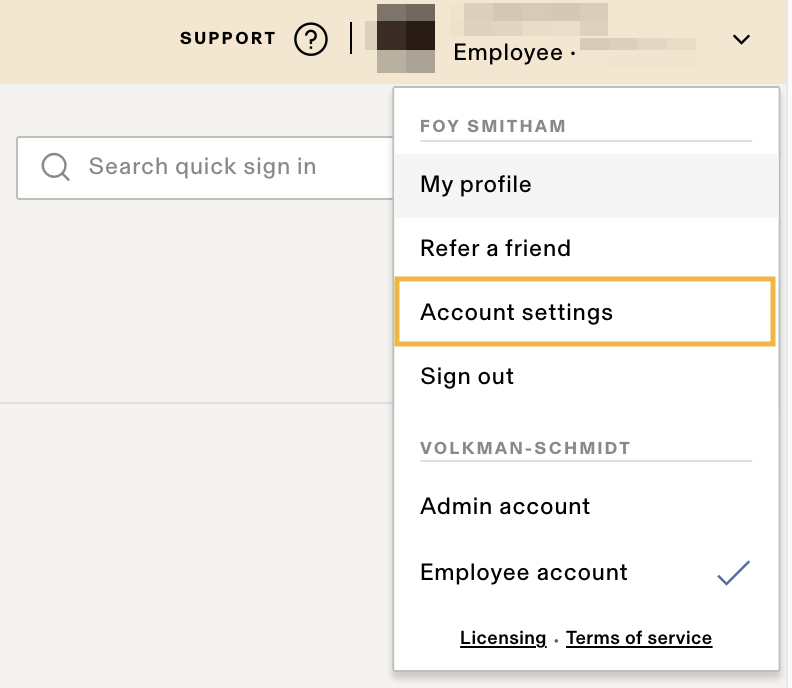
On the top right of your Rippling employee account, click your profile > Account settings.
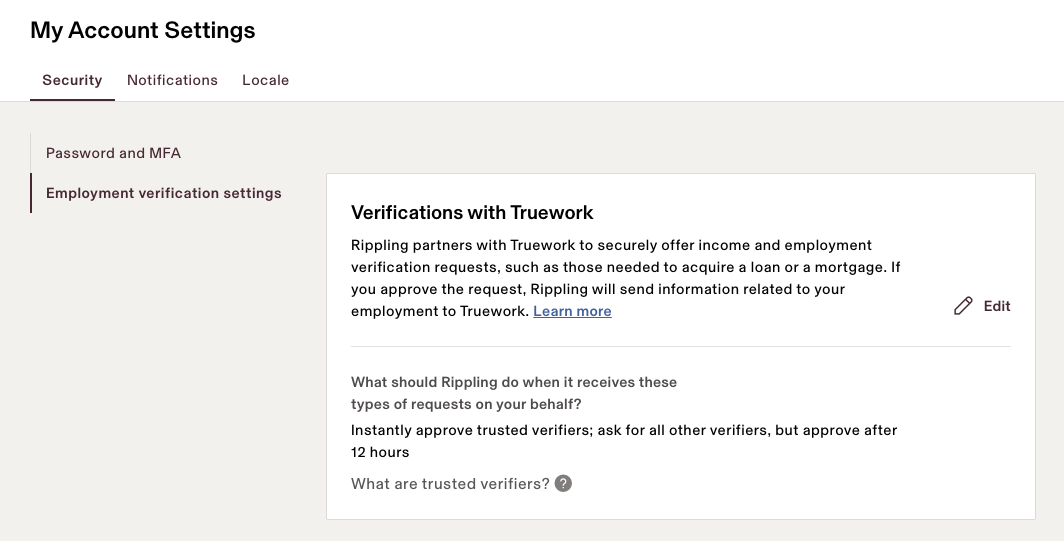
Select Employment verification settings > click Edit to update your settings.
Income verification can be a hassle, for you, for the company that’s trying to verify your income, and honestly, sometimes even for HR (you’d be surprised how many companies need a “special” version of an income statement). We have good news for you, your income verifier, AND for us…
We work with Truework, a third-party verification site that’s directly connected with Rippling. Its a secure, hands-off, self-service income verification site that allows you to determine how you want to authorize income verifications and the party verifying your income to get what they need without waiting for a call back from HR. How amazing is that?! 🎉
In a 🌰shell, the verifier reaches out to —> Truework who reaches out to —> Rippling who sends you an —> email and then will —>
You can view the available verification request settings from your Account Settings in Rippling.
The available options include:
Rippling defaults to auto-approving requests from trusted verifiers in an attempt to ensure you’re never inappropriately declined when applying for a loan or mortgage. If you ever want to update your verification settings, you can do so from your Account Settings in Rippling.
To learn more about trusted verifiers, see this article from Truework.
On the top right of your Rippling employee account, click your profile > Account settings.
Select Employment verification settings > click Edit to update your settings.